Appium is a server implementation that conforms to the WebDriver protocol and is the most popular method for mobile app automation. When inspecting an app's screen with Appium, you retrieve the page source using the Get Page Source command. This page source is also referenced when accessing elements using XPath.
Page Source in Web Automation
The WebDriver protocol's description of the "Get Page Source" command states: "The Get Page Source command returns a string serialization of the DOM of the current. browsing context active document." In the context of browser automation, this simply means executing document.documentElement.outerHTML. In other words, it's an HTML representation of the screen.
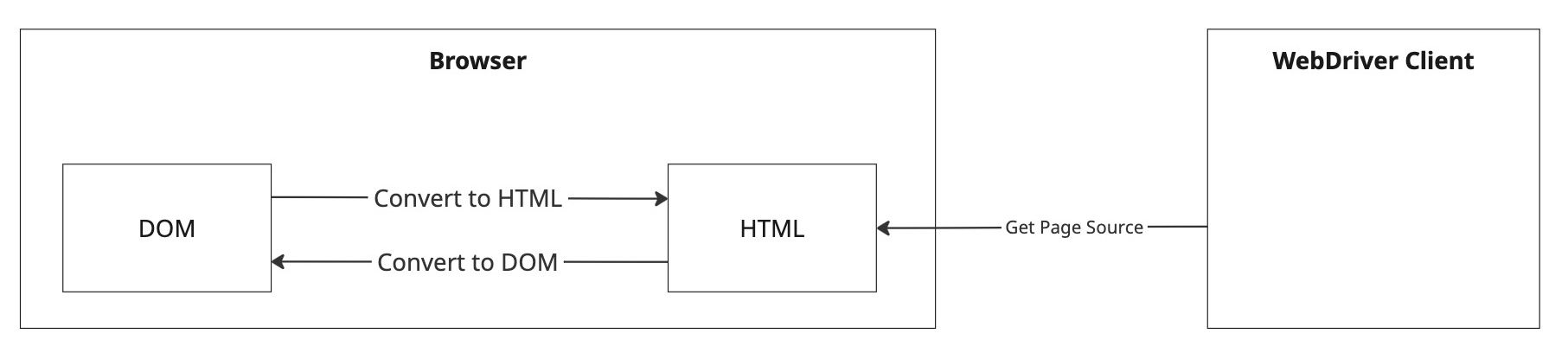
In browser automation, DOM and HTML are mutually convertible
Given that the DOM is the internal representation of the screen in a browser, and HTML can completely reproduce the DOM, it's fair to say that page source is the source code of what's currently displayed on the screen. In other words, in the browser environment, DOM/HTML provides a perfect interface for programming. Very straightforward, right? However, this is only true in the context of browser automation...
Page Source in Mobile Automation
Now let's look at what page source means in mobile automation. First, it's important to note that while Appium uses a common protocol, the available parameters and behavior differ completely between platforms. There's no standard internal representation that can be referenced platform-independently like the DOM. In the sense that the DOM is an interface for programming, the equivalent internal representations are UIView on iOS and View on Android. However, what you get from Appium's "Get Page Source" is certainly "a string serialization" of these, but it's quite different in nature from what you get in browsers. (On iOS, there's also a more flexible command called "mobile: source", but the essence is the same)
In Appium, access to the internal representation is done through testing frameworks such as XCUIAutomation and UI Automator. In these frameworks, you don't directly access internal representations like UIView or View, but instead manipulate target objects through automation proxies such as XCUIElement and UIObject2. When retrieving the page source, these automation objects are serialized into XML representation by server processes that run persistently on the device, such as appium-webdriveragent (iOS) and appium-uiautomator2-server (Android). This serialization is a process that Appium has defined on its own. Unlike HTML for DOM, this series of transformations is not intended to restore the original objects in any sense. These transformations are one-way. The word "source" usually means "the origin of something," but page source in Appium is not source—it's merely a projection that captures some aspects of the internal representation.

In mobile automation, conversion from internal representation to XML is one-way
This fundamental difference in mechanism actually affects automation. First, as explained, a considerable amount of information is lost through the conversion from internal representation to XML. You don't necessarily have access to all information that exists on the screen or in the internal model. Moreover, the conversion process is not well-defined like it is on the web. For example, on iOS, elements at nesting levels deeper than 50 cannot be retrieved by default. While you can change what elements to include in the page source through settings to some extent, you need to make trade-offs on how to optimize for your use case. Additionally, what kind of tree is generated strongly depends on the target OS version and Appium version, so even if the application being automated is identical, there's no guarantee you'll always get a consistent tree.
Performance is also an issue. In contrast to web page source retrieval, which is essentially just outerHTML and extremely lightweight, mobile page source retrieval involves fairly complex processing, such as waiting for elements to reach an idle state. As a result, it can easily take more than ten seconds, and when the screen structure has a certain number of elements or more, it may become completely impossible to retrieve it at all.
As you can see, page source in mobile automation has quite different characteristics from its web counterpart, but in practice, you often have no choice but to rely on it, so you end up using it with workarounds.
Sample Code
The following code demonstrates how elements get dropped when nesting becomes deep, and how retrieval times out when the page source becomes large.
Summary
- Page source in mobile automation is fundamentally different from web page source
- Mobile page source is not actually source (it's a one-way transformation)
- Information included in mobile page source is not complete
- Mobile page source is unstable (depends on platform and Appium version)
- Mobile page source retrieval is very slow (sometimes impossible)